X32 — FOH / PA
PA vocals run through SuperRack Performer. PSE → Tune RT → Curves AQ Live → C6 Compressor → DeEsser → IDX Live → H-Delay.
A newer release is available. Your saved session will be preserved.
Choose your workspace to start the right setup workflow.
Checking show status…
Show details →A two-console rig, built like a tour.
PA vocals run through SuperRack Performer. PSE → Tune RT → Curves AQ Live → C6 Compressor → DeEsser → IDX Live → H-Delay.
The monitor path uses compression and low-cut only.
Three workspaces, one stage assistant. Your saved progress stays with each module.
No P24 systems are used. Sound lead approval is required before any transmitter changes.
Your choice changes the instructions—not the safety and verification requirements.
You can change your mode anytime from the top of the checklist.
Interactive stage inputs, physical stageboxes, personal monitoring, and Thulsi's DP48/Ableton setup.
The equipment behind every performance — what it does, how it connects, and what to check. Tap a card for details.
Vocals, instruments, keys, tracks, click and cues are organized across the WING input map. Stereo pairs may share a single active fader.
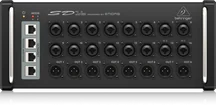
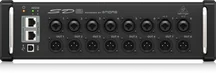
One SD16 and two SD8 boxes provide 32 continuously numbered stage inputs: SD16 1–16, first SD8 17–24, second SD8 25–32. Each physical connection is checked before soundcheck.
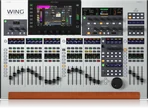
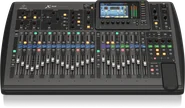
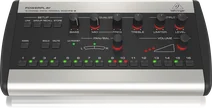
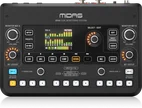
Behringer WING manages stage inputs and musician monitor routing. The X32 handles front-of-house mixing for the audience; AES50 connects the systems.
WING User Signals feed AES50 A33–48, then the SD16 Ultranet output and Ultranet hub to the musicians’ P16 personal mixers. Current source assignments must be checked against the WING show scene. No P24 devices are in use.
Thulsi — lead keyboardist, conductor and Ableton Live stems manager — has a dedicated Midas DP48 connected to WING AES50 C. This is a separate monitoring branch from P16 / Ultranet.
Two Sennheiser EW IEM G4 transmitters and one XSW IEM share an AC 41-US antenna combiner and a directional shark-fin antenna.
Three additional NUC in-ear monitoring systems operate in the 5 GHz band. Their frequency planning is separate from the Sennheiser UHF IEMs.
Six distinct 2.4 GHz channels serve nine Xvive IEM units. Verify shared-channel assignments and listen for local Wi-Fi / Bluetooth interference. These RF channels are not the same as WING / Ultranet audio channels.
Ten Sennheiser dynamic microphones for singers, from the e835 through e935 family, support the live vocal line-up.
Sennheiser wireless microphone extensions provide flexibility for wired microphones. The exact extension systems and RF frequencies must be confirmed separately from the IEM bands.
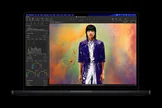
Dedicated control computer for managing WING and X32 digital consoles.
Portable control for front-of-house sound changes during the performance.
Waves SuperRack Performer runs real-time Waves plug-ins on the MacBook Pro as part of the X32 front-of-house processing workflow. Plug-in count and latency depend on the current show session. Confirm the actual show laptop at load-in.
Manages television-spectrum research, IEM frequency coordination and Ethernet programming of the two Sennheiser G4 transmitters.
Show-playback computer used by Thulsi for synchronized backing tracks, musical cues, clicks and stems.
Interfaces keyboard audio and the Mac-based setup, supporting MIDI-bus tone changes during the performance. Exact ports and MIDI configuration require show-scene verification.
Every great performance begins with a musician.
An original, consistent piano melody gains guitar and drums in sync, ending with a recorded audience applauding. Sound plays only when enabled; the default recording requires internet unless a local recording has been imported. Conceptual flow, not a literal signal-by-signal wiring diagram. SuperRack Performer runs Waves plug-ins on the M5 Max MacBook Pro (64 GB). P16 and DP48 are separate monitor branches. No P24 devices.
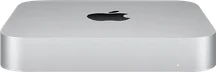
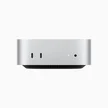
 Mac mini M2 · Our production lab computer for pre-show preparation.
✨ Months of preparation. Dozens of moving parts. One live Jersey Rhythms performance.
Authoritative reference: WING Edit screenshots captured November 6, 2026. WING strips 1–32 and AES50 A sources are separate concepts; A14/A16/A31 have mismatched or unconfirmed input sources: stereo source pairs 23/24 (Ivan Keys), 25/26 (Raj Guitar), 27/28 (Backing), and 29/30 (Thulsi Keys) are shown as single stereo faders. Historical only: X32 spreadsheet stagebox groupings and P16 channel/bus list. Verify physical sockets and current Ultranet patch before cabling. No P24.
Current WING Edit channel/source labels (Nov 6, 2026). Physical stagebox groups are historical workbook references; sockets and P16 channel feeds need verification. The right leg of a stereo source is not a separate active fader.
WING source evidence
Starting recipes from your December 12 card. Adjust controls on the WING, then record the actual settings here. No console programming or live metering is performed.
Select a channel to view its recipe.
The card lists this input as empty. Select the actual musician/source recipe and confirm its channel mapping before saving.
Stageboxes use continuous input IDs: SD16 1–16 · SD8 #1 17–24 · SD8 #2 25–32. Each tile shows the physical port and saved WING channel/musician. Unassigned tiles show channel references only, not confirmed connections.
Saved patch status only — these lights do not measure live audio. Assign and verify sockets in Inputs 1–32.
Profiles use newer WING channel labels. P16 assignments from the older X32 workbook are not considered current. Verify physical sockets and P16 feeds against the live patch.
Dedicated Midas DP48 via WING AES50 C. Verify stereo keyboards, Ableton backing/stems, click/cues, and DP48 group/source assignments against the live WING scene. Keep click/cues out of FOH Main if that is how the approved show scene is routed.
Musician notes save locally when you leave the field.
Add one station for each physical P16 and enter its musician, Ultranet hub output and monitor connection. No P24 devices are used.
Distribution reference: WING User Signals 1–16 → AES50 A outputs 33–48 → SD16 Ultranet → Ultranet hub → individual P16s. Thulsi: WING AES50 C → DP48. Verify scene and cables; station ownership, physical ports and P16 bus feeds are not preassigned.
Distribution reference: WING User Signals 1–16 → AES50 A outputs 33–48 → SD16 Ultranet → Ultranet hub → individual P16s. Confirm actual scene and cables on stage. Verify each actual P16 input feed. These diagrams show signal paths, not network IP connectivity.
Supplied November 6 WING transcription; original screenshot unavailable for independent recheck. Confirm the current scene. These AES50 outputs are not themselves proof of the 16-channel Ultranet P16 assignments. Source #16 shows CLK&CUE bus 8 in WING screenshot.
B3 BK_TRK · B4 Anu/Sam/Nish · B5 Vish&Siji · B6 Shrey/Ivan · B8 CLK&CUE · B9 Raj-GTR · B10 Arul-PAD · B11 Thulsi KEYS · B12 DRUMS · B13 ST-DL. Other bus definitions require verification. Not a current P16 channel list.
P16 hub wiring remains a physical verification task. Do not assume the legacy X32 P16 channel/bus spreadsheet is the current WING Ultranet mix. Ultranet is not ordinary Ethernet networking.
Thulsi controls keys, Ableton stems and show cues. Verify the exact DP48 group mapping, power and audio outputs during line check.
These three Sennheiser UHF IEM systems are distinct from Ultranet audio distribution. Three NUC IEM systems use 5 GHz, while nine Xvive IEM units use six 2.4 GHz RF channels. Plan and test each wireless band separately; the Shure-to-WSM workflow applies to the Sennheiser UHF system.
A helper may check tasks, but only the sound lead can approve the final wiring/monitor routing.
Saved locally on this device. Export a patch sheet for the sound team and a JSON backup for restore.
G 587.000 / A 537.000 / XSW 488.000 MHz. These are excluded under the saved Ananda Mandir planning restrictions.
Review local TV broadcasts before accepting IEM frequencies. A ZIP code provides only a rough location; use venue coordinates with an authorized lookup provider whenever possible.
Upload a Shure Wireless Workbench .cxl, or load the saved Ananda Mandir sample. The app automatically extracts flagged UHF TV channels and their MHz ranges.
The app labels Shure-flagged channels as Protected / blocked. Unflagged channels remain Unknown until independently verified. Check the affected IEM bands below.
After reviewing the exclusions, download the proposed blocked-band file. This does not alter WSM or authorize transmission.
This downloads all 17 flagged UHF channels in the saved Ananda Mandir export, including channel 14 outside your three IEM tuning ranges. The current-review converter exports only channels overlapping your IEM bands.
No verified live lookup provider is connected.
Shure-excluded channels are proposed blocked. Unflagged channels stay UNKNOWN until independently reviewed; none is automatically cleared.
Enter the named reviewer in Required Approvals before recording this TV review.
WSM import: Frequencies/Bands → Import list, using a COPY of the WSM project. This exports blocked entries only; it does not automatically modify WSM or certify frequencies as legal. Avoid overwriting verified restrictions.
RF approvals and audit are stored only on this browser/device. Names are manual attestations, not authenticated identities or independent authorization.
Record the outcome after testing all three bodypacks together through the shared antenna system.
Frequency editing locked